Watchlists, alerts, digests
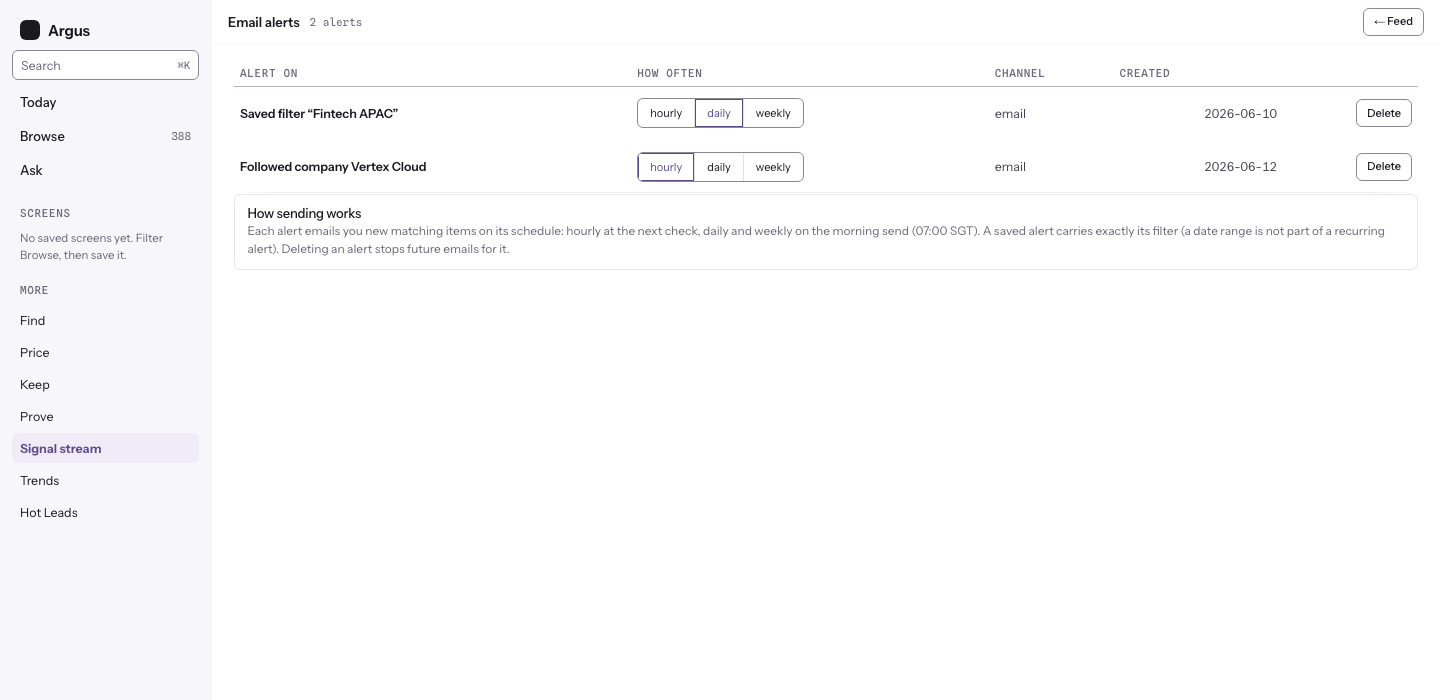
Three ways Argus comes to you instead of waiting to be checked: follow the names you care about, alert on the lens you built, and let the digest bundle your slice on a schedule. Manage them all on the Alerts page, opened from your account menu at the top right.
Watchlists
Press Follow on any company or event page (reach one from the top-bar search, or by clicking a name in the feed or screener). Followed names live on the feed's rail, and the Alert me button on those pages turns a followed name into its own alert, so movement on the names you track finds you first.
Alerts
To alert on a market slice: apply your filters on the Feed, then press Alert me on the filter bar and pick a cadence. Hourly means at most once an hour, at the next check; daily and weekly arrive on the morning send. The alert carries the filter you applied (a date range is a browsing control and is not part of a recurring alert). Deleting an alert stops its future emails and sends nothing.
Digest sections
Beyond the plain signal list, a digest can carry standing sections:
- Movement radar on your own sponsors. This runs on an engagement's roster inside the Ducket workspace; see Renewal radar.
- Buying-window entries for a market slice: the Hear when this window opens block on Find adds this (its button reads Email me new entrants). A company is included the first time it enters the band, then the digest stays quiet about it.
- Mover flags when an event's entrant cohort crosses its flag floor; see Trends.