Buying window
Find lists every company we have observed regularly sponsoring events in your market, with a tag on each row naming where it stands on those rosters today. Observed roster behaviour alone, a dated receipt behind every cell, and a strict rule about when Argus refuses to judge.
Where: Find in the left rail, or ask on Ask ("who is in a buying window in fintech?" runs this same read, cited).
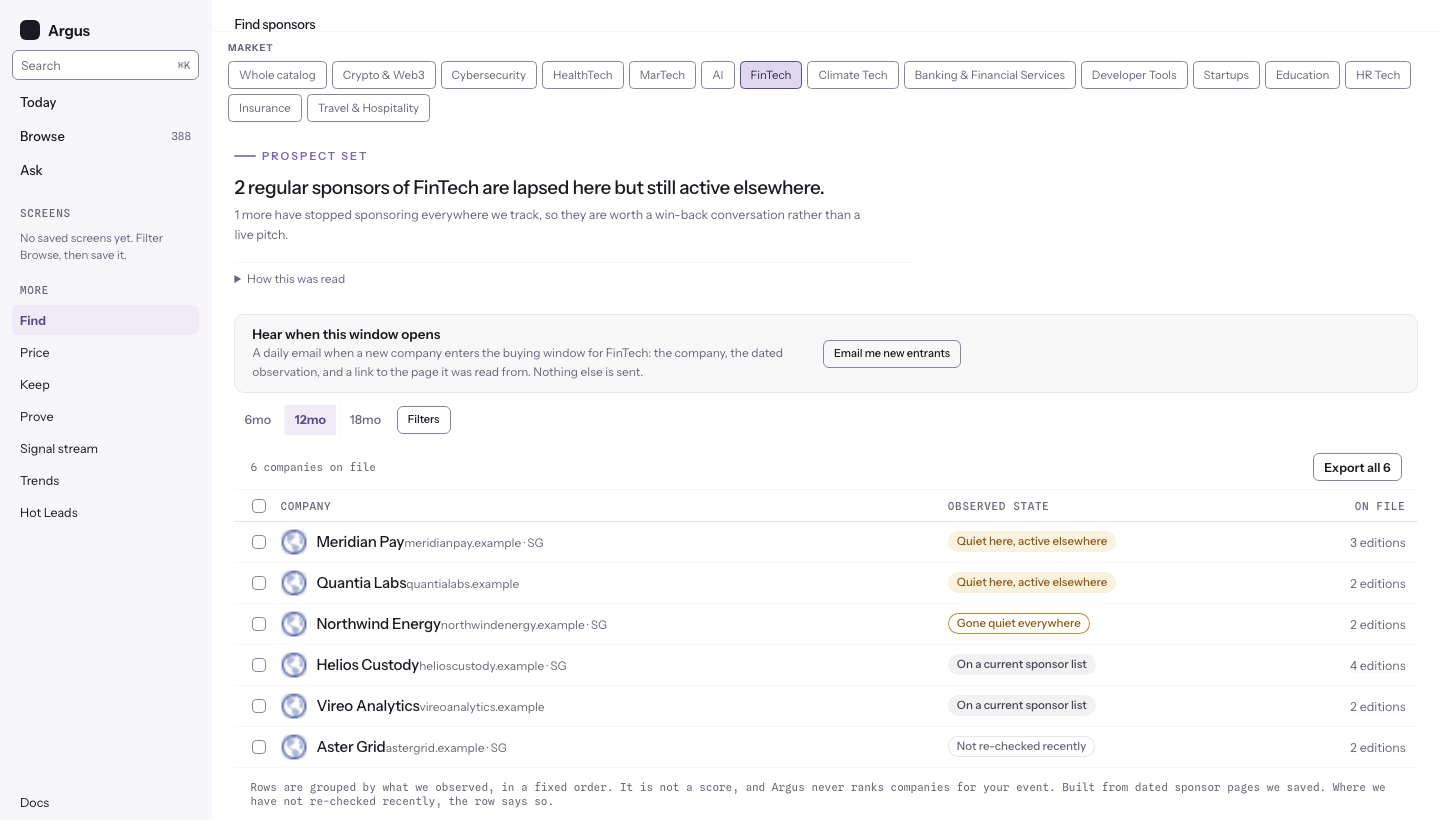
The four states
A company enters the pool by sponsoring your market's tracked events at least twice (distinct editions). Every pool member renders as a row; the tag says what we observed about its roster timing:
- Quiet here, active elsewhere. A regular sponsor whose recent editions were re-crawled without it re-appearing, while it stays active at events elsewhere. The elsewhere part matters: the company is still spending, so the quiet is specific to this slice.
- Gone quiet everywhere. Lapsed from the reference events with no fresh sighting anywhere we track. Kept separate on purpose, because absence is weaker evidence than activity somewhere else.
- On a current sponsor list. We saw the company on a current sponsor page of these events within the window. It is sponsoring here now; the dated captures behind the row show exactly where.
- Not re-checked recently. Argus has not re-crawled enough of the company's reference events recently to judge, so it refuses to call a lapse. This state exists so a blind spot in crawling cannot masquerade as a lapse.
The order of the list is fixed and stated at its foot: the quiet-here rows first, then gone-quiet, then currently active, then not-re-checked, and inside a group the most recent sighting first. It is a display order over dates and counts. It is never a score.
A market where nobody has lapsed
A covered market can hold a real pool and zero lapsed companies. The page says exactly that: "All 195 regular sponsors of bfsi are on a current sponsor list right now, and none has lapsed", and lists the pool with its receipts. Knowing a market's regular sponsors are all spoken for is a reading of the market in its own right. A market we do not track yet says so plainly instead of pretending an empty read is a finding.
Selecting companies and exporting the list
Each row has a checkbox, and the toolbar above the list shows the pool count beside one action: Export. It downloads the rows on screen (or only the ones you selected) as a CSV: the state tag, the company name, its domain and country as we hold them, the edition count, the last sighting date, and a link to the newest saved capture behind the row. The file carries exactly what the page shows; nothing is added or inferred. Use it to move a set of companies into your own outreach tooling in one step.
Choosing a market, filters, and the window control
Your market is the question, so it sits at the top of the page as a row of chips: pick a vertical and the list narrows to that slice. On your first visit Find opens on the market you named in the welcome wizard (your first tag is your primary). If Argus does not know your market yet, the page opens as a chooser instead: nothing loads until you pick, the deepest-covered markets are suggested first with their tracked-event counts, and "Whole catalog" is itself a choice on the row. After that the page always comes back the way you left it in that tab. Country lives behind the Filters button, with the active count on the button. Beside it, the quiet window is adjustable: 6, 12, or 18 months. A shorter window reads faster markets; the default of 12 fits most annual conference cycles.
The list itself tells you which of three things is happening. While it is working you see text-shaped placeholder rows. When nothing matches, it says so rather than showing an empty box. When the read fails, it names what failed and offers Retry, so a broken read never looks like an empty market.
The new-entrant alert
Hear when this window opens sits under the answer and says what it sends: a daily email when a new company enters the buying window for your market, with the dated observation and a link to the page it was read from, and nothing else. The subscription is scoped to the slice you have filtered; manage it under alerts and digests.
Reading the list
The page opens with one sentence, written from the read itself. Under it, How this was read holds the arithmetic: how many companies the read covered, how many of them are currently active here, how many editions counted as regular, the window length, and how many companies could not be judged either way.
Each company is one row: a checkbox, its mark, its name, one quiet line with its domain and country, the state tag, then how many editions it sponsored. Click the name to open the company's own page. Click the edition count to open the dated captures behind the row: each capture names the event and year it was read from, links to that event's page in Argus, and the receipt drawer carries a button for each of the company's other captures. That walk (row, capture, event page) is how you read for yourself why a company is tagged as quiet.
The mark is the same one the rosters and the companies index use: the company's icon looked up by its domain, with an initial as the fallback when no domain is on file or no icon loads. A company we hold no country for shows its domain alone; we never borrow the country of an event it sponsored.