Trends
Who moved in the tracked market, and what the movement adds up to. The strip of movement counts is always on; every chart and table below it is a card you add to your own board. Every figure is a count of captured rows.
How the board is laid out
The four counts at the top report the latest observed period, broken out by direction: every change recorded, then how many companies were newly listed, how many changed level, and how many came off a list. Each count also states which way it moved when it honestly can: this period's count minus the prior period's, with both periods named. On a young corpus the strip says "first tracked period" instead, because the period before it predates tracking and its count is unknown rather than zero. Once three or more tracked periods are on file, a small bar-per-period sketch appears under each count so the shape of the run is visible without opening the chart. What each count means sits in its card's hover tooltip; the only sentence a card prints on the board is the reason a number is absent. The size of the catalog sits in the page footer, because how much is on file is a coverage fact rather than a reading of the market; the Coverage board owns that question in full.
Your board is the cards you add
The strip is the only thing every member sees. Everything else on Trends is a card, and adding one is a pick-then-build motion: on a first visit the board shows one ghost outline per available card, drawn as the shape that card renders, and clicking a ghost only SELECTS it, marking it with a checkmark and a filled outline. Nothing is fetched or rendered yet. Pick as many cards as you want, either from the ghosts or from the "Add data" rail on the right edge, which shows the same checklist and the same running count, grouped by chapter; the two surfaces edit one shared selection. A "Generate board" bar appears once anything is selected, and one click there builds every picked card at once, rather than one card arriving per click. Clear discards the selection instead. Once a board is built, a "New board" control sits beside the section index and clears it in one click, returning you to the picker to start over. The rail collapses to a slim strip when you are done. Your built board is remembered in this browser, it changes what is shown and never what is counted, and a card you never selected is not fetched at all. The emailed movers alert still lands on its module whether or not you added it: a link you followed shows its card for that visit without changing your board.
Added cards sit in a fixed order under the vertical lens: the market read first, then three chapters:
- Who is moving right now. Named companies with a dated change, newest first. Start here if what you want is a call list.
- Who keeps coming back. The same events compared across their own editions: who returned, who has not been seen this time, and who sits at different levels elsewhere.
- How the market is shaped. The same records rolled up over time and across markets, plus the entrant cohorts and the deals grid.
The section index above the chapters carries each module's own headline count, so the map of the page also says what each chapter holds, and each panel repeats that count beside its own title. A module that is still loading, refused by its coverage floor, or failed carries no number in either place: a number it has not earned would be a claim.
Every panel is on the board at once
Each module is a panel, and every panel is on screen from the moment the page loads. A panel shows its findings inside a fixed height with its own scrollbar, so a table of forty rows is read in place instead of pushing the rest of the board off the screen. Nothing is dropped to fit: the rows past the fold are one scroll away inside the panel itself.
When a panel holds more than its height shows, its edge fades and an Expand control appears in the header. Expand lifts the height limit for that panel alone and gives it the full width of the board, which is what a wide table or a chart needs; Collapse puts it back. Expand all, at the end of the section index, opens every panel at once. What you have open is remembered while you move around the app, so stepping into a company profile and coming back does not close it again.
A panel whose content already fits shows no Expand control, because there would be nothing to expand, and neither does a panel held back by its coverage floor: that one stays a single line carrying its reason, as described next.
When a view will not draw
Every view on this board needs at least eight captured rows of the kind it counts before it draws anything. Below that it prints the count and the reason in place of the chart, for example "4 rosters on file. This view draws at 8 or more". A thin view says it is thin, and says what is thin about it, rather than showing a line through a handful of points or a blank that reads as zero. Such a view also takes a single line rather than the height of a chart, so a chapter whose coverage is still filling in cannot read like a chapter of findings. A short line there is about coverage. It never means nothing happened.
Renewal board
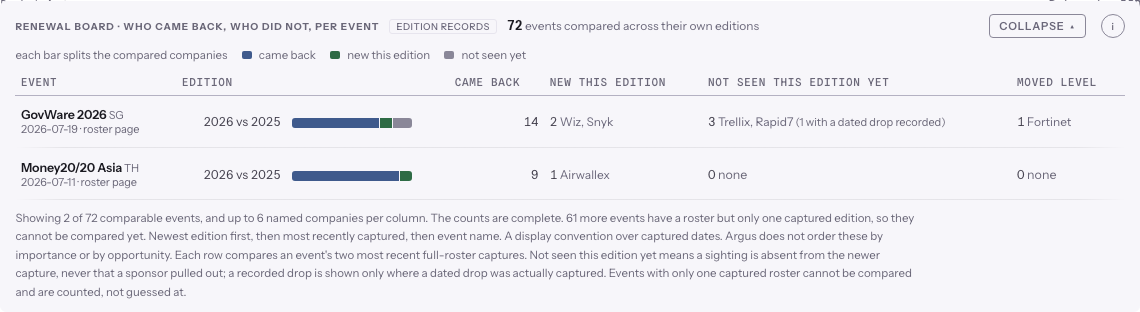
For every event where a full sponsor roster has been captured in two editions, this shows who came back, who is new this edition, who has not been seen this edition yet, and who moved to a different level. The event cell carries the roster page and the date it was captured.
- Two captured rosters, or nothing. An event with only one captured roster cannot be compared. It is counted underneath the board rather than guessed at.
- Not seen is not a departure. "Not seen this edition yet" means a listing is missing from the newer page. Where a dated drop was actually recorded, the row says so separately.
- Only the names fit on screen are shown. Each column names up to six companies and says so. The counts beside them are complete.
- The split is drawn once per row. Each row also draws came back, new this edition, and not seen yet as one bar on a shared scale, so two events compare at a glance. The bar draws the same counts the columns state and nothing more.
In market now
Companies that made a move in their favour in the last 120 days: newly listed as a sponsor somewhere, present on an event's newest roster when they were absent from the one before, or moved up a published level. Each row names the company, the event, what was observed, and the date it was captured.
Repeat sponsors
Companies listed at three or more editions of the same event in a row, with the years spelled out. If an event has no edition on file for a year inside that span, the row says so, so a run is never read as coverage it does not have. The list follows the page's vertical lens: filter the board by an industry and the runs, the total and the coverage floor are all re-read for that slice, with the header naming the slice it shows.
Different level at two events, same year
Where one company appears at two events in the same year and sits at a clearly different level at each, both placements are shown side by side with their pages and dates. Two rules keep the comparison meaningful:
- Both events must publish a ladder of named levels at least two deep that year. A level only means something next to the other levels the same event sells, so an event selling one flat "sponsor" label has nothing to compare.
- Position is measured inside each event's own ladder. A top level at a three level event is not treated as a top level at a six level one. The row shows the position and the depth, for example level 1 of 4.
Market read
The Market read sits at the top of the board and puts the signals into plain words: a short, prioritized set of trends worth a sourcer's attention for the vertical you have in focus. It is the one place on Trends where a model reads across the signals and says what they add up to.
The reading is grounded the same way every Argus surface is. Each trend cites the dated, receipted observations it stands on (a buying-window signal, a roster change, an entrant cohort, a cross-event footprint), and the model may only interpret those observations. It never invents a company, a figure, or a date. Anything the reading cannot stand behind is dropped or moved to a separate Flagged to verify section, so a hunch never sits beside a fact.
- Asserted trends are the reads the observations support with confidence. Each one lists its receipts under it.
- Flagged to verify holds the thinner reads: a hypothesis, or a low-confidence call. Check the receipts before you act on one.
A read is cached per scope, so opening the same lens again costs nothing and returns the same trends. Use Refresh to build a fresh read once the underlying signals have moved.
The two clocks
Two time bases run on this page, and each module says which one it is on, because mixing them unlabelled would make history look emptier than it was. Live tracking counts signals from the moment Argus started watching. Edition records follow each event's own editions on file, including past editions filled in from web archives, so they reach back years further.
Change events over time
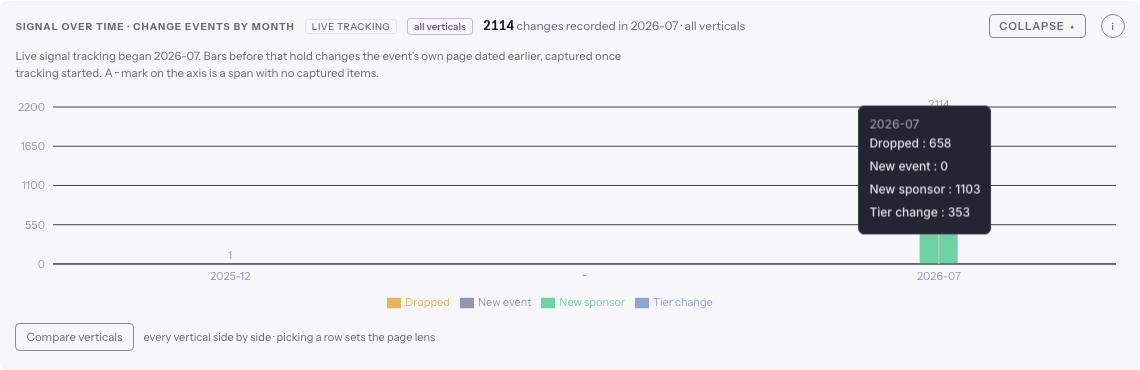
This chart is on the live-tracking clock. Three details keep it honest:
- Every bar shows its count. A three-item bar next to an eight-hundred-item bar reads as three, never as empty.
- Gaps are marked. The chart only draws periods that hold data; a ··· mark on the axis stands in for any skipped span, so distant periods cannot read as adjacent.
- Early bars are labelled. Sometimes a page states when a change happened, and that date can be earlier than tracking. Such bars are shown and labelled as page-dated history. The chart reads by month until enough distinct quarters are on file to make a quarterly chart worth reading, and then it moves to quarters.
Compare verticals
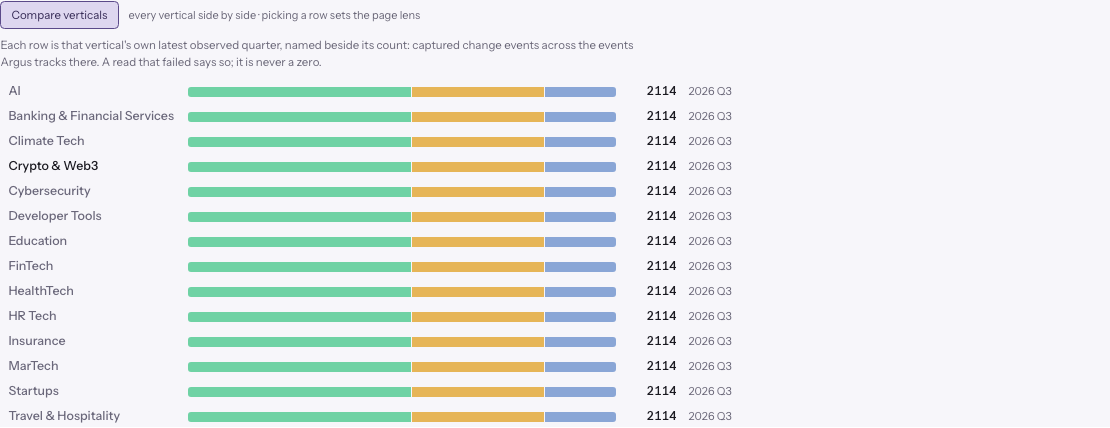
The vertical lens shows one slice at a time; the Compare verticalscontrol under the change-events chart is the one place the slices sit next to each other. One click fans the same counts out across every vertical, one row per lens: that vertical's latest observed quarter, named beside its count, split into the same four change families as the chart. Rows sort by count, and picking a row sets the page lens, so the comparison doubles as the way in.
- A failed read stays a failure. A vertical whose read failed says so in its row. It is never rendered as a zero.
- Each row names its own quarter. Verticals are compared on their own latest observed quarter, so a lens whose record is older cannot silently read as current.
Sponsor movement by edition year
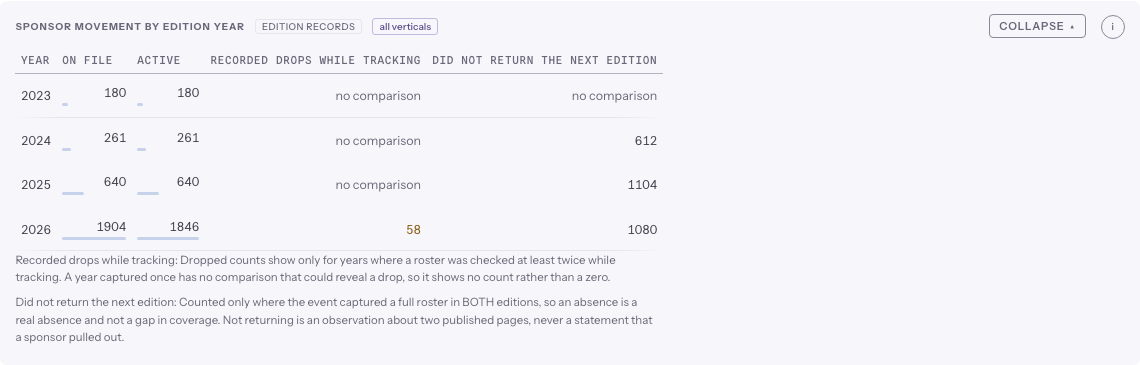
This table counts listings per edition year: how many were on file and how many are still active. Two further columns count movement away from an event, and they measure genuinely different things:
- Recorded drops while tracking. A sponsor that was on one edition's page and gone from the same edition's page at a later look. This needs two looks at the same edition, so a year captured once from the archive shows "no comparison" instead of a zero. A zero there would claim knowledge Argus does not have.
- Did not return the next edition. A company on one edition's full roster and absent from the next edition's full roster. This is counted only where both editions have a full roster captured, so an absence is a real absence and not a gap in coverage. Two editions that share no company at all are left out of the count as well: rosters with nobody in common were read from pages that cannot be compared, so an absence across them describes what Argus captured. Those companies keep their rows on the event pages, where the comparison is labelled instead of counted.
The two columns are never merged and never summed. Each states its own basis underneath the table. Neither one says a sponsor pulled out: both describe what two published pages showed.
Movers: entrant cohort shifts
The movers section reads each event's NEW sponsors this edition against that event's own history. When an unusual share of a cohort shares a trait, for example country of origin, the slice is flagged with its baseline shown. Every cohort member carries the dated roster capture it first appeared on. Flags are observations with receipts; Argus never asserts a cause.
Companies first seen sponsoring, by year
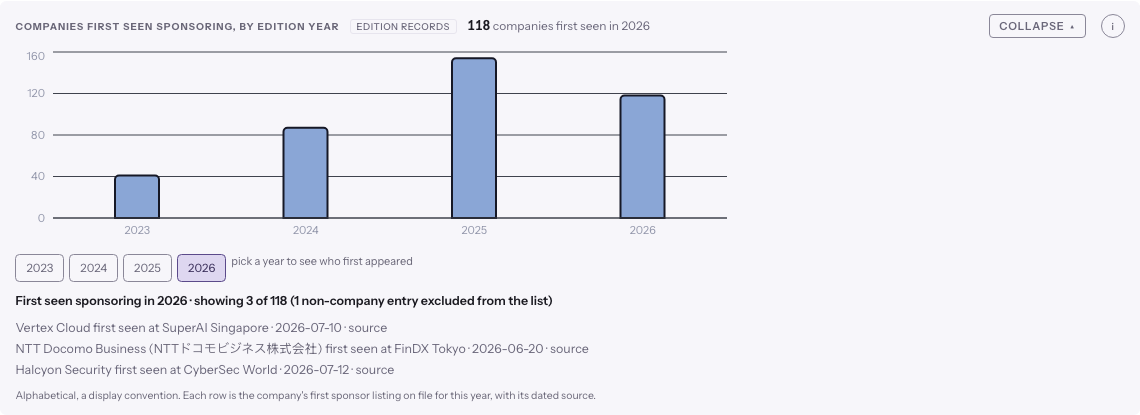
Each bar counts the companies whose first sponsor listing on file lands in that year. Click a bar, or use the year buttons, to open the list behind it: who they are, which event they first appeared at, and the dated page behind that first sighting. Long lists are capped and say how many of the total they show.
Only listings we stand behind count here. Where a row has been set aside (a capture that turned out to describe a different event, a claim we could not re-verify against the page it came from), it does not date a company and it cannot put one in a cohort on its own. That means a company is dated by its earliest listing we can still show you the page for, which is sometimes later than the earliest row in the raw record.
Active deals by vertical and country
This grid places the current active deals across vertical and country, the same counts the Coveragepage holds in depth. Use it to see where the tracked market sits before you plan a push into it. Events with no country on file get their own "Country not on file" column, which always sits last: an unknown location is a gap in what we hold, and folding it into a neighbouring country would invent a fact.
The development-data banner
If the app is reading a development database rather than the live corpus, a banner at the bottom of every Argus page says so and stays there while you scroll. On the live corpus nothing appears. It exists because numbers read off a seeded test database look exactly like real ones.
Where pricing went
Published rates now have their own page. Open Pricing for the method and what the gaps mean, or reach it in the app as the Price job. Old links into the Trends pricing section still work and forward there.