The feed
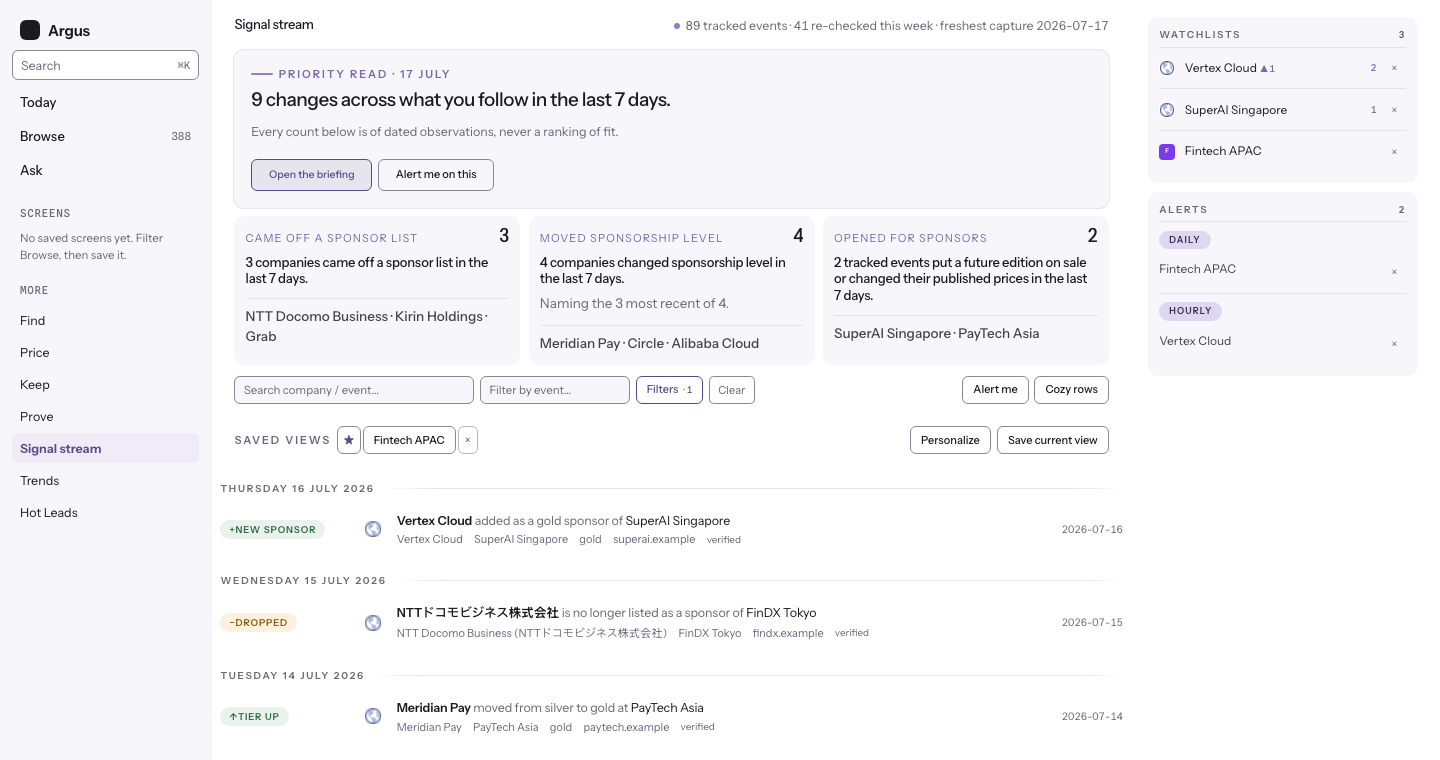
Every observed sponsor change in the tracked market, newest first. Each row is one dated signal with a link to the page it was read from. Open it as Signal stream under More in the left rail; the Today briefing reads the same rows for you.
What the signal types mean
Each badge carries the delta's direction: a plus for a company entering a roster, a minus for one leaving, an up or down arrow for a move between ranked tiers. The mark is read from the signal's own before and after values.
- New sponsor. A company appeared on an event's sponsor page where it was not listed before.
- No longer listed. A company that was on the sponsor page is missing from it. Argus confirms an absence on a second complete crawl before reporting it, so one broken page does not fire a false drop. Argus saw the listing go; it does not claim to know why. Where the edition it is missing from has not started yet, the row says the company is not yet on that roster and names the edition's start date, because a sponsor page still being filled in cannot show that anyone left.
- Tier up and tier down. The same sponsor moved between ranked tiers, for example silver to gold, and the badge says which way. A move involving an unranked role label (partner, exhibitor, media) shows as a plain tier change, because roles have no up or down. Cosmetic relabelling of a section heading does not count.
- New event. A new conference entered the tracked catalogue in a category you can filter on.
- Sponsorship open and terms changed. Forward-looking signals: an event published a sponsor prospectus or call for its next edition, or a published sponsorship price changed between two captures. See Selling season.
- Announced, dates set, and news signals. The catalogue also records an event announcing its next edition or setting dates, and news-sourced budget, intent, and competitive signals about companies. Each carries its source like any other row.
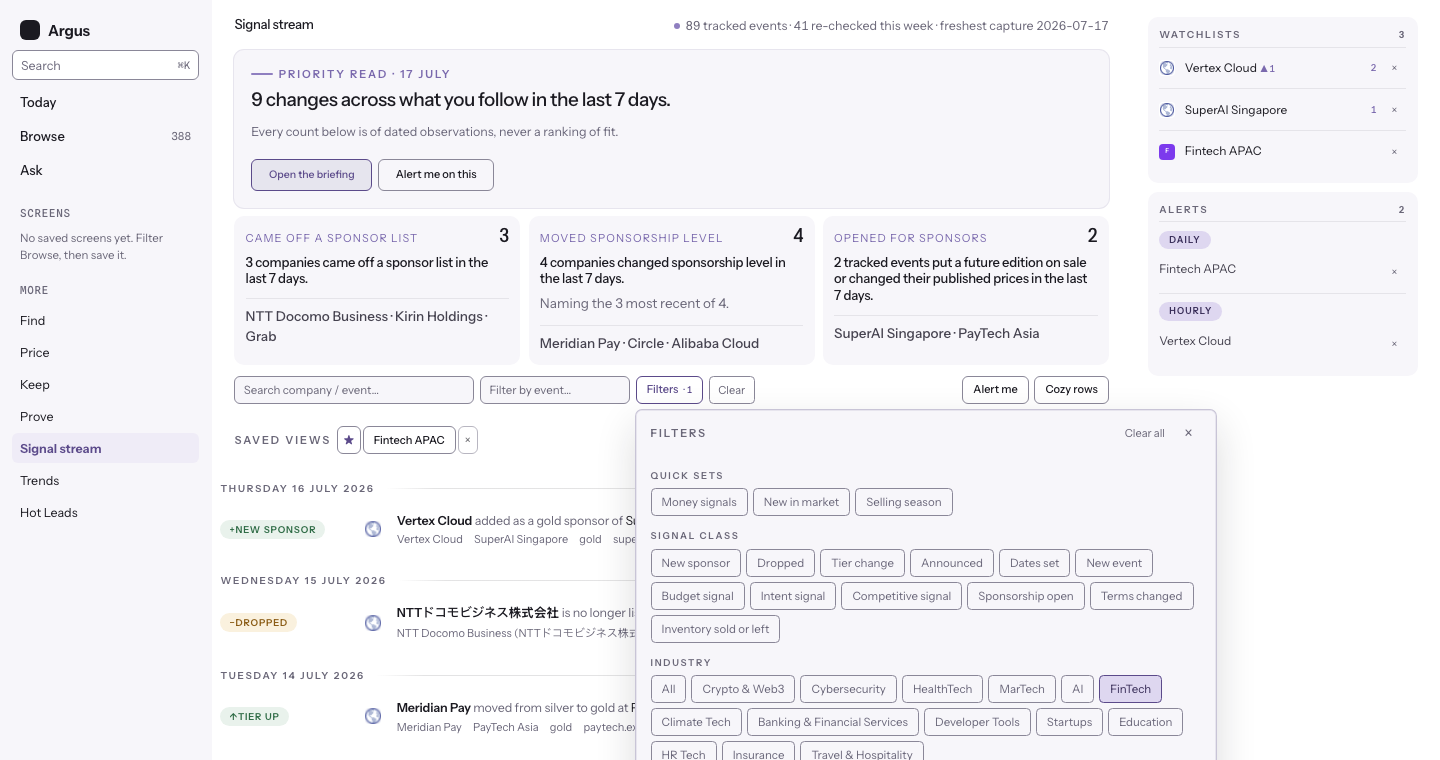
Filters and saved views
One Filters button opens every control: signal types, presets, vertical, role, country, tier, verification, and a typed date range. The active filter count shows on the button, so you always know a lens is on. To keep a lens, press Save current view in the Saved views row under the filter bar and name it; the saved view appears as a chip right there, ready to re-apply or delete. The starred view is the default the feed opens with, on every device you sign in from.
The Role chips split the stream the same way the screener does: sponsors, exhibitors, media partners, and side-event hosts are different commercial relationships, and you can watch each on its own. Picking a role scopes the stream to company signals carrying that role at the event. A dropped sponsor still shows under Sponsors (its role comes from the sponsorship it held), and event-level rows such as announcements step aside while a role lens is on. An event can also carry more than one industry tag, and the Industry filter matches any of them; its profile page lists every tag it holds.
Beside the search box, Filter by event narrows the stream to a single tracked event. Click it to browse the full tracked catalogue in a dropdown, or type a few letters to narrow the list; pick an event and every sponsorship change Argus has observed there shows in one place. The lens rides the address bar, so the view is shareable, and it clears from its chip. It is a viewing lens rather than a saved filter; to be alerted about one event, follow the event instead.
The watchlist rail and the new-items pill
The rail lists the companies and events you follow, and this is the only page it appears on. Follow from a company or event page and it shows up here. While you read, Argus checks for new matching signals in the background; a pill appears when fresh items are waiting, and the list stays still until you ask for them. Nothing reorders under your cursor.
The receipt behind a row
Clicking a row opens its receipt: the source page, the observation and crawl dates, the page hash, the evidence quote, and the page capture (the tier-section clip leads when one is on file; the full page is one tab away). The source link lands on the exact mention: it opens the live page with the company name highlighted, in browsers that support text highlighting. The live page may have changed since the capture; the dated screenshot remains the receipt.
A "no longer listed" row cites both sides: the crawl the name is missing from, the prior sighting where it was last seen, and, under As last listed, what the page said while the company was still on it. Absence itself is never quotable, so the prior listing is the closest evidence and is always labelled as prior.
Four badges on a "no longer listed" row
Some absences are worth reading with a caution attached, so the row carries it rather than leaving you to work it out. Each badge is a small plain label on the row itself, and none of them removes the row from the stream:
- Roster still forming. The edition the company is missing from has not started yet, so its sponsor page is still being published. Read the row as a slot to watch rather than as a sponsor who did not come back.
- Current listing on file. Argus also holds a current, serving listing for that company at that same event edition, so the two captures disagree. The badge shows the disagreement instead of picking a side; open both receipts and see what each page said.
- Press-only history. Everything on file for that company at that event is press coverage or the company's own page. Those sources can show that somebody was there and can never show that anybody was missing, so the earlier edition behind this row is a weaker baseline than a captured roster.
- Earlier record withdrawn. Argus no longer serves any sponsorship row for that company at that event, so the earlier edition named in the headline cannot be checked on its pages any more. The row stays with its date and its receipts, and the badge tells you the baseline behind it is gone.
On a question of what an absence means, the stream labels rather than hides. The surfaces that recommend act differently: Keep leaves out an absence it cannot read competently, and keeps a count of what it left out.
The same four badges appear on the movement list in Check your sponsor list, which now reads through the same builder as the stream: the same events left out, the same retired companies left out, the same quietened tier changes, and the same rows set aside. The two surfaces showed different things for a while, and they cannot drift apart again, because there is one rule and both read it.
One thing does come off the stream
Argus sets some roster rows aside: a name lifted from a page section that was never a sponsor list, an organiser listed among its own sponsors, a roster read off a different event's page. Those rows stop counting everywhere a roster is shown, and a company page says so. The stream used to miss that question, so it could report "no longer a sponsor" about a listing the company page beside it had already stopped showing. A signal built on a row Argus has set aside now comes off the stream, and off the lead surfaces with it.
The two decisions are different, and the difference is the point. A badge is for a row whose evidence is sound and whose conclusion needs a caution. A row leaves the stream only when the evidence itself is one Argus no longer stands behind. Nothing is deleted either way: the observation keeps its date, its page and its receipt. What stops is Argus stating it to you as a fact.
Moving through history
The feed reads in fixed pages, with the page size under your control (25, 50, or 100 rows). The counter shows where you are in the total, so a long backlog stays navigable.