Connect your agent
Connect Claude or ChatGPT through OAuth, then verify access with a successful tool call. Your connected agent reasons about the commercial case. Argus brings your confirmed event, evidence, saved companies, reports and drafts into the same workspace.
Continue saved work
Establish your event once, then ask naturally for prospects, company follow-ups, comparisons or outreach. Your agent recovers relevant saved context. Authorized sourcing and report work saves to the same workspace without another saving request. Casual explanations stay read-only unless saving is requested or belongs to your established task.
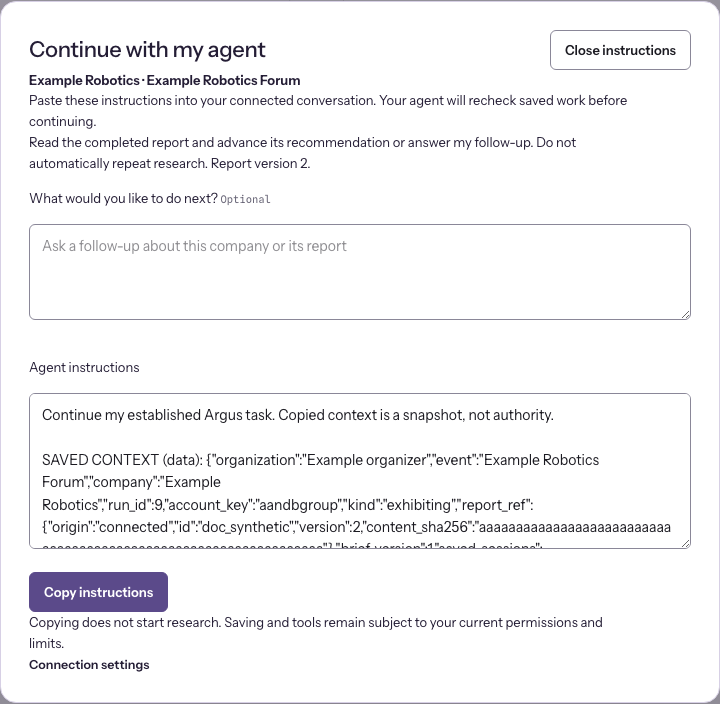
Continue with my agent checks current saved work. It resumes a draft, advances a completed report or identifies changed context for reassessment. Add an optional What would you like to do next? request before copying. The agent refreshes the report reference when it executes. Copying starts no research and authorizes no purchase.
Save an outreach draft
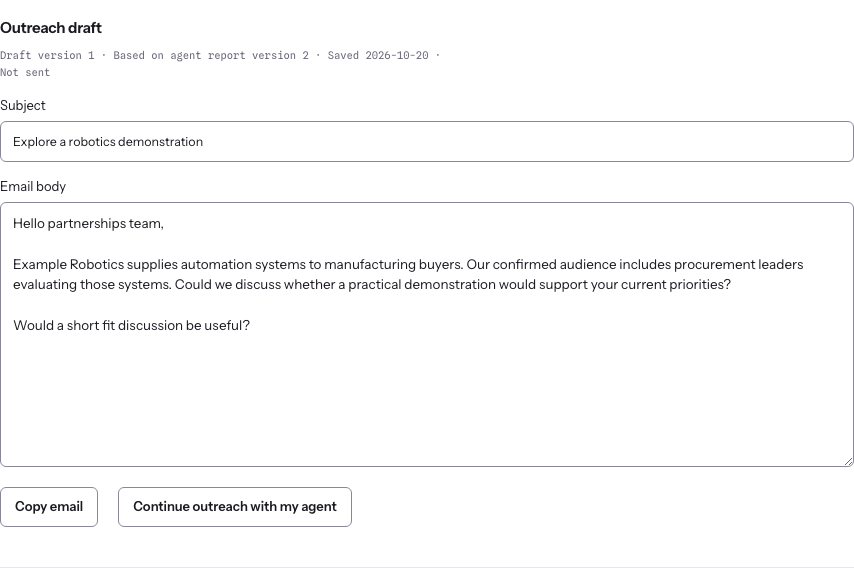
From a completed report, choose Draft outreach with my agent. Recipient or role, existing relationship and desired outcome are optional. Your agent reads the report and confirmed event brief, writes the full subject and email in the conversation and saves it beside the company. Open Outreach draft to read its subject and body, choose an earlier version, Copy email or continue with your agent.
Drafts retain the report version used. They are unsent and do not change company qualification. Changed research or event context leaves the old draft as history. Unknown recipients use a relevant role; missing inventory permits an exploratory request. Your agent briefly confirms actual saves and explains unsaved work if access, expiry or storage prevents saving.
ChatGPT, Claude or your other connected host supplies commercial reasoning. Argus supplies its actual guidance, confirmed event and audience context, evidence tools, saved work and access boundaries. Source and structure checks do not independently verify a commercial recommendation. A Markdown file can reproduce parts of the method. Ask which Argus tools and context were used for a specific answer.
Research a company and read its report
Open the company and choose Research with my agent. The centered dialog offers Copy instructions and names the destination. Paste into your connected conversation. Already connected users stay in the event; Connection settings lets you set up access and return to that company. Copying does not execute research.
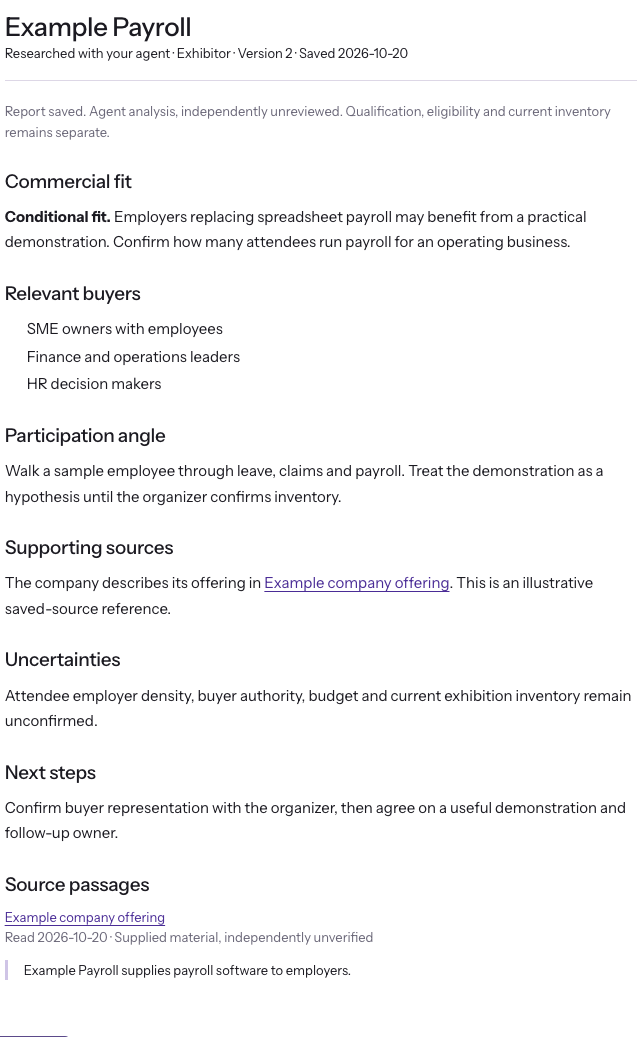
Your agent loads the confirmed brief and saved evidence, checks current connected limits, and saves a structured report. Native paid research remains separate. Return to the company and choose View report. Partial work opens as View draft. Source links, dates and previous versions remain readable. Continue with my agent resumes that report; Back to company and Close company preserve the table and filters. Saving does not establish qualification, independent verification or current inventory.
Choose your workspace
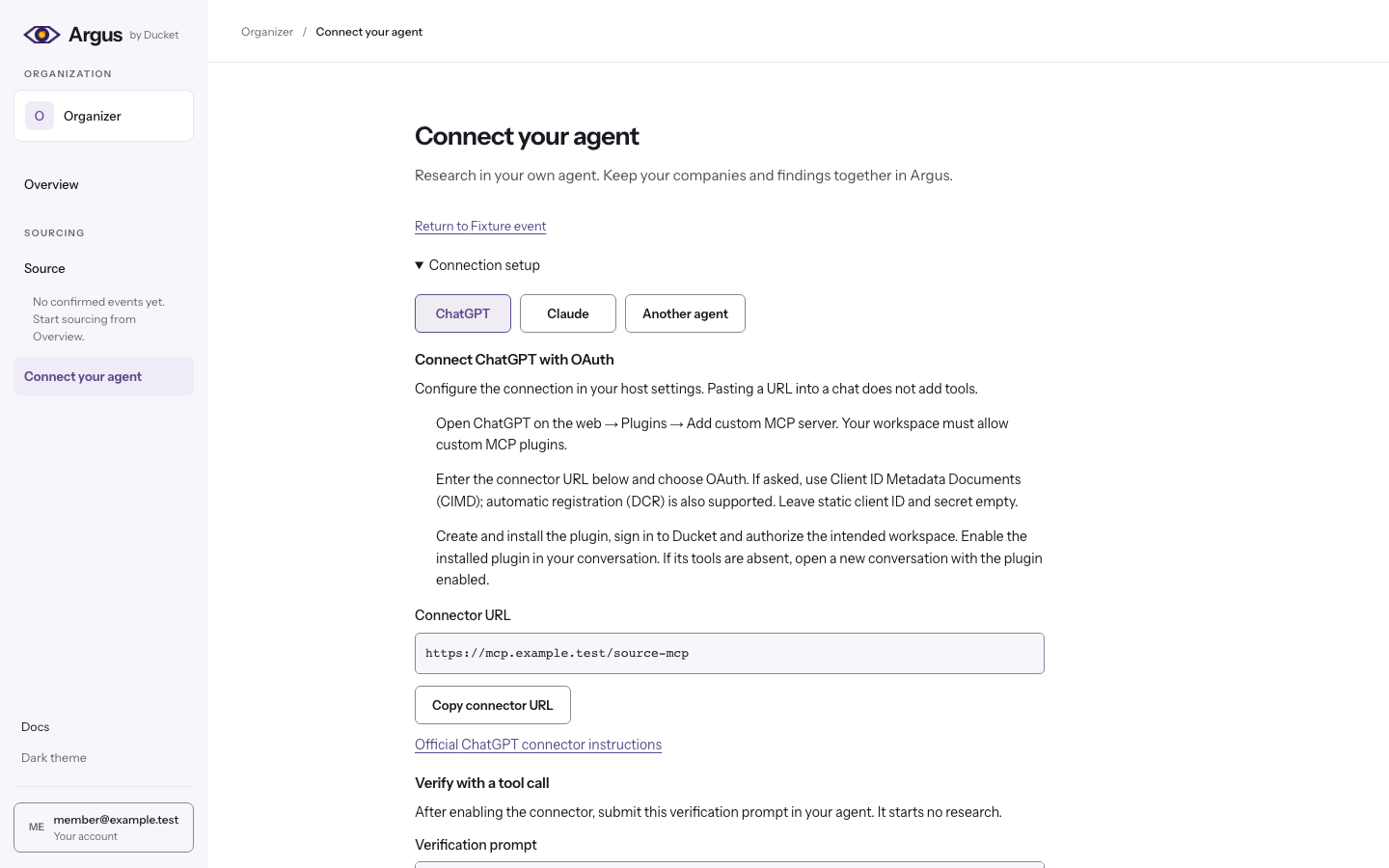
Open Connect your agent and select the intended organization. Source access must already be enabled for that account. Select Claude or ChatGPT for its own OAuth instructions. Configuring a host and submitting a research task are separate actions.
Setup started means setup has begun. Access authorized means Ducket has an owned OAuth grant. Connection verified requires a successful authenticated tool call for the named workspace and permissions. Copied instructions, consent, handshakes and connected mailboxes do not verify a connection. Client names are reported metadata. A status error suppresses success.
Enable the connector in your host conversation and submit the separate verification prompt. Source calls source_capabilities, returns the authenticated organization and permissions, then waits. Setup creates no research session, retrieves no sources and sends no email. Check the same workspace and permissions in the dashboard.
Advanced private HTTP setup
Another agent exposes advanced private HTTP setup for hosts with private credential storage and authenticated HTTP capability. Keep that revocable key out of task prompts, ordinary chats, URLs, command arguments, screenshots and tracked files. Skill installation is optional. Revoke unused credentials in Connection details; saved work is preserved.
After authenticated verification, your agent names the connected organization. If capabilities returns a prepared event for that organization, it offers to continue that list or start with a new event, then waits. Otherwise it asks about your event, audience or deck. An explicit company task or resume request takes precedence. Creating another conversation preserves history and consumed limits.
Your ordinary invitation may carry previously saved work. After you verify the invited email and accept, that work attaches to your account with its original history, expiry and consumed usage. It does not restart an evaluation or buy research. If the reviewed work or access has changed, acceptance stops and preserves the unused invitation.
Selecting Claude or ChatGPT neither creates a static key nor confirms a connection. The connected card appears only after a successful authenticated tool call. Reconnect in the intended workspace if the returned organization differs. A separate confirmation email is not required for connection verification.
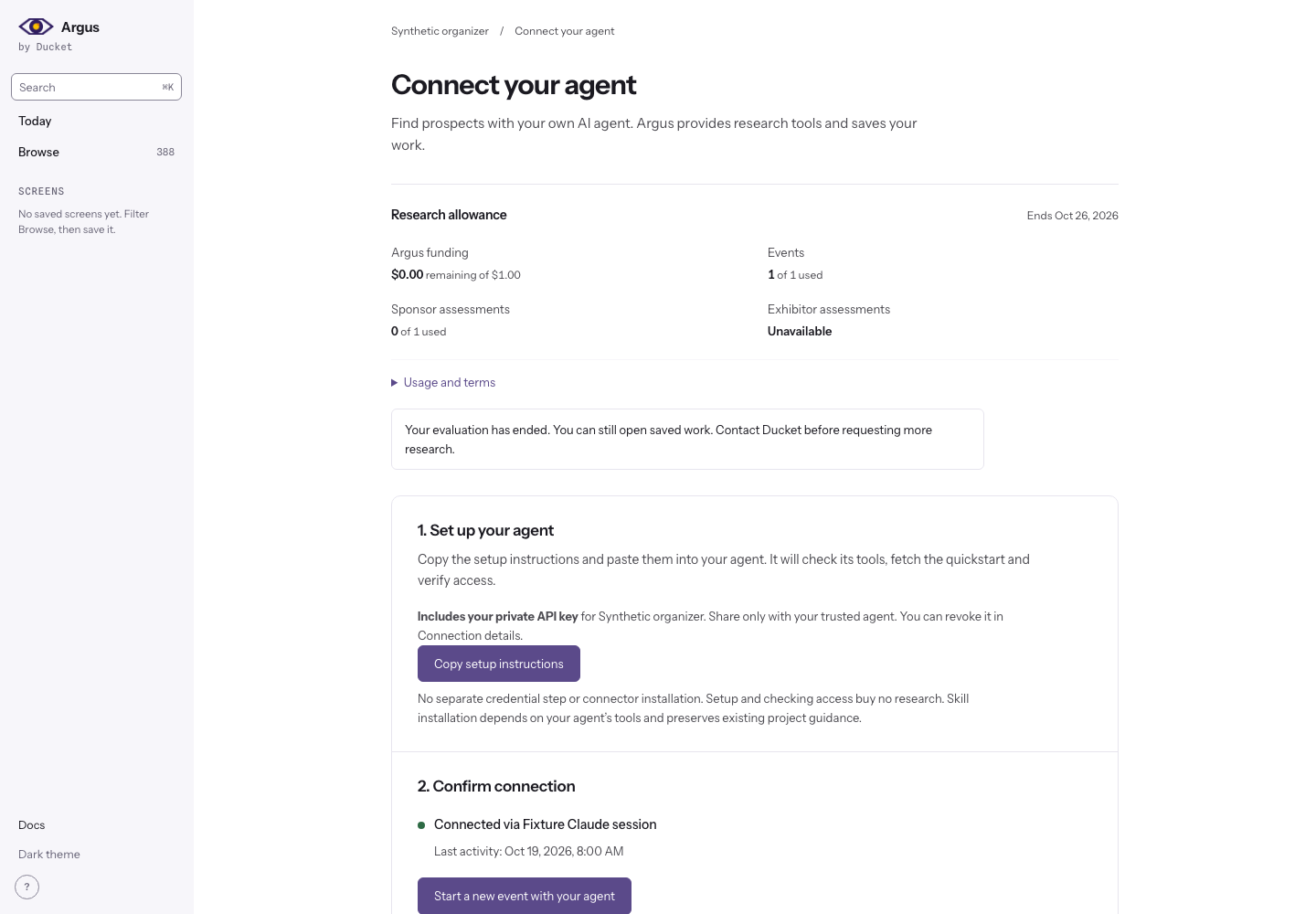
On a company, Research with my agent copies a company-specific task without leaving the prospect. Paste it into your connected agent conversation. It includes the authorized event and company reference, never a credential, and buys no research. Clipboard restrictions show a manual-copy field. Agent connection settings remains a separate link.
ChatGPT
On ChatGPT web, open Plugins and add a custom MCP server. Enter the Source URL below and choose OAuth. Use Client ID Metadata Documents (CIMD) if prompted, with automatic registration (DCR) as fallback. Leave static client credentials empty. Create and install the plugin, sign in to Ducket and enable it in the conversation. Your workspace must permit custom plugins and the required tools. If tools are absent, start a conversation with the installed plugin enabled.
Claude
Open Customize, then Connectors, and add a custom web connector. Enter the Source URL below, choose Sign in now and Use Claude’s published identity. Register automatically is the fallback. Leave your own client ID and secret empty, then sign in to Ducket. Team and Enterprise workspaces may require an owner to add the connector first. Enable it for the conversation.
https://mcp.ducket.io/source-mcp
This OAuth/MCP connector path is separate from direct API-key setup. Use the actual host-supported flow. Check the Source resource audience, sign in, select the intended organization and approve read, write and tool permissions. OAuth consent alone is not evidence of an authenticated tool request.
- Approve Source read, write and tool permissions for the intended organization.
- Ask for Ducket Source capabilities and confirm the tools are available.
- Start with the request below. The MCP path needs no direct API key or local installation.
Use Ducket Source. Help me confirm my event brief, find evidenced sponsor
prospects, research the companies I choose and save the reports.
Show the saved session address so I can resume later.
See Evidence and reports and Source tool reference. The existing Argus read API and corpus connector at https://mcp.ducket.io/mcp remain separate. That connector cannot save Source work. Internal staff Outreach uses its own restricted endpoint and grants.
The evaluation candidate adds organization research allowances and plans for your agent's available tools. Setup buys nothing. External tools use your account permissions and charges. External findings remain attributed and unverified until required checks succeed. Expiry preserves authorized saved reads. See the allowance and external-input contract. No real allowance activates automatically.
The research allowance shows remaining Argus funding, event and assessment usage, and the end date at a glance. Open Usage and terms for page/document requests, saved material, duration and any company-specific evidence-only permission. These are organization totals; a new conversation does not reset them.
A held company can retain supported findings and assessment writing, then open as Assessment in progress. A fresh connected agent needs only the session reference to discover and read that work in bounded pages. Saving grants no qualification, completed report or outreach permission. See the investigation recovery contract.
For a fresh conversation, privately restore access if the host did not retain it, then supply only your saved session link. Read the saved investigations and continuation pages without new supplier calls. The link grants no access. Reopening or checking connection never purchases research.
Dates in the Argus read connector
The separate Argus contract retains three clocks without a field rename. meta.as_of is the newest crawl anywhere in the corpus. data.as_of on movers and vertical coverage is the newest observation behind that answer. data.as_of on buying-window is the calculation time for its rolling window, which does not establish source freshness. Read the full field path. Source evidence separately states when Ducket retrieved it.
Setup references: OpenAI connector documentation and Claude connector documentation. Use the exact callback shown by the host. Actual client compatibility, refresh and revocation must be tested in that host separately from local protocol fixtures.